 Tập Nhạc
Practise from the score, not falling notes.
Loop the bars you miss, memorise in short chunks, read a little faster every week. Free, offline, no account.
What you get
Read and hear
The real score, with aids that fade as your reading grows.
- Reads with you
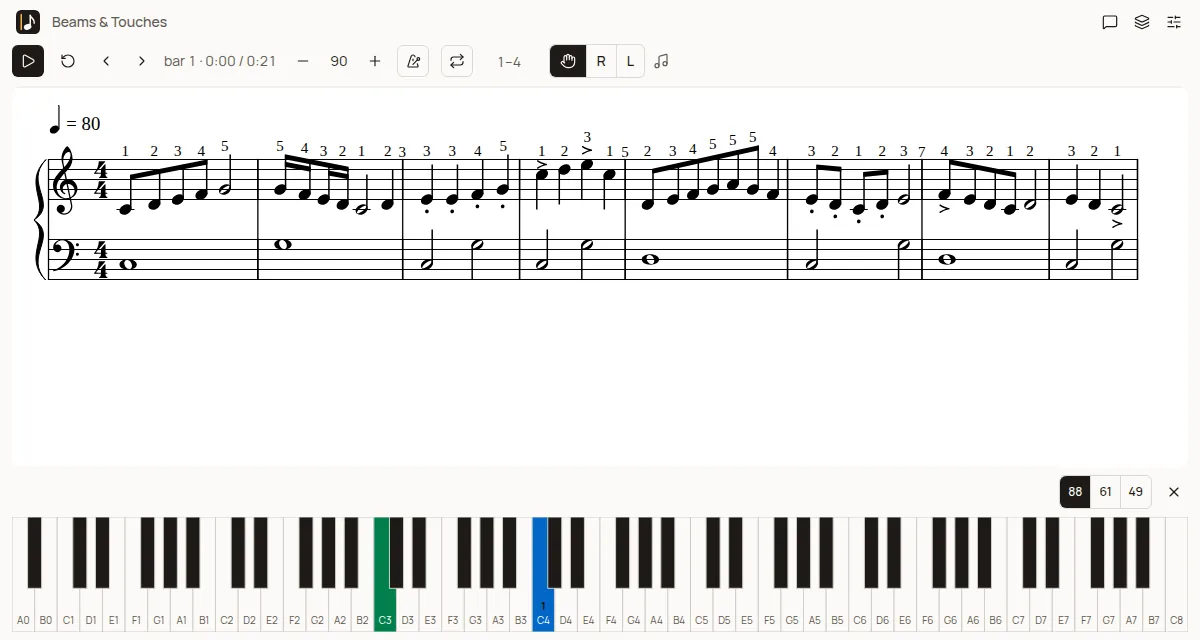
- Import MusicXML or MIDI. Note names, finger numbers and the current note can be shown on the score and faded out.
- Hears every note
- With a MIDI keyboard (or the on-screen one) each note is judged right, wrong or late, per hand.
Practise where it counts
The app remembers where you miss and picks what to practise.
- Finds the hard bars
- Misses are counted per bar. One tap loops a bar or passage slowly, then the tempo steps up.
- Memorise in chunks
- Split a piece into chunks (Đoạn) and fade the score out in stages.
- Today's plan
- Spaced review picks what to practise today.
- Theory practice
- Note reading, key signatures, intervals, chords, scales, rhythm and ear training in 10-question rounds, answered on your piano, plus a fresh sight-reading piece for your level. Try a round.
- Follows a recording
- Attach an audio file or YouTube video to a piece, tap each bar start and the score cursor follows. Slow down to 50%, loop from bar A to bar B.
Around the session
Small tools that keep practice moving. Your data stays yours.
- Page turner pedal
- Full-page performance mode with half-page turns, Bluetooth pedal turns and auto-turn on the last line.
- Graded course
- 50 original free pieces (CC0), ten levels. The next piece unlocks when you play the whole piece clean at full tempo.
- Pencil annotations
- Draw, highlight and erase right on the score, then hide the ink when you do not need it.
- Favourites
- Heart a piece in the library to collect it in the Favorites collection.
- Private and offline
- Everything stays on your device. Sync is optional.
How it works
Import
Bring a MusicXML or MIDI file, or start from the bundled sample pieces.
Play
Play along on a MIDI keyboard or the on-screen one. Each note is judged right, wrong or late.
Loop the bars you miss
Misses are counted per bar. Loop just those bars slowly, then step the tempo up. Read the method.
Questions
Is Tập Nhạc really free?
Yes. There is no paid tier, no trial and no account. Your scores and settings are stored on your own device.
Do I need a MIDI keyboard?
No. You can use the on-screen keyboard. If you have a MIDI keyboard and a browser that supports Web MIDI, the app listens to it and judges each note.
What files can I import?
MusicXML (.xml, .musicxml, .mxl), MIDI (.mid, .midi) and MuseScore files (.mscz). Most notation programs and many score sites can export one of these.
I use MuseScore. Can I open my scores?
Yes. The app opens MuseScore .mscz files directly; it also imports MusicXML (.xml, .musicxml, .mxl) and MIDI (.mid, .midi). Compare Tập Nhạc with MuseScore.
Does it work without internet?
Yes. Open the app once, then it works offline as an installed web app. Everything is stored locally.
Pick a piece and start
It takes about a minute to import a score and loop your first bars.